

So we did our second benchmark for Firebolt, this time from MySQL to demonstrate the speed of Wirekite in the enterprise data migration space from one database to another. We decided to not to compare this with Airbyte since we ran into some errors. Also we think the Airbyte Postgres to Firebolt benchmark will give you a good idea where it generally stands.
I do want to mention here that Firebolt benchmark is a little different, and slightly slower than what it could possibly be and the reason being that our database server is in GCP while our Firebolt bucket is in AWS. That is definitely a network hop, that will do some latency, as opposed to going from GCP to GCP. This probably explains why Firebolt benchmarks are slightly slower.
Benchmark Details
Table
As always we used the same firenibble table with a billion rows It has 15 columns and has all the datatypes - numbers of various shapes and sizes, some strings and some dates. This makes sure that these datatypes fit in most databases. Also we have used the same table everywhere to make sure our benchmarks stack up nicely in comparison with each other.
 CREATE TABLE `firenibble` (
  `f0` bigint NOT NULL,
  `f1` bigint DEFAULT NULL,
  `f2` bigint DEFAULT NULL,
  `f3` int DEFAULT NULL,
  `f4` float DEFAULT NULL,
  `f5` float DEFAULT NULL,
  `f6` float DEFAULT NULL,
  `f7` float DEFAULT NULL,
  `f8` varchar(256) DEFAULT NULL,
  `f9` varchar(256) DEFAULT NULL,
  `f10` date DEFAULT NULL,
  `f11` date DEFAULT NULL,
  `f12` date DEFAULT NULL,
  `f13` varchar(256) DEFAULT NULL,
  `f14` varchar(256) DEFAULT NULL,
  `f15` varchar(256) DEFAULT NULL,
  PRIMARY KEY (`f0`)
) ENGINE=InnoDB DEFAULT CHARSET=utf8mb4 COLLATE=utf8mb4_0900_ai_ci DATA DIRECTORY='/mnt/benchmark/mysqldata/'
And here’s the 1 billion rows.
mysql> select count(*) from firenibble;
+------------+
| count(*)   |
+------------+
| 1000000000 |
+------------+
1 row in set (13 min 4.70 sec)

mysql>
Machine Configurations
For MySQL we created an n2-standard-64 GCP instance with all the standard configurations - 64 CPU’s and 256 GB RAM in the us-central region. We installed Ubuntu version 24 and MySQL version 8.
For Firebolt we created an engine with M size (medium), 5 nodes, 2 clusters and it was COMPUTE_OPTIMIZED. We created the engine in us-east region. Firebolt does not offer us-central region. Also Firebolt does not offer L size by default that other cloud vendors offer. We got the following message when we tried to upgrade our engine.
 => ALTER ENGINE my_engine SET TYPE = "L" NODES = 5 MIN_CLUSTERS=1 MAX_CLUSTERS = 2;
2025/03/15 22:46:31 ERROR query ALTER ENGINE my_engine SET TYPE = "L" NODES = 5 MIN_CLUSTERS=1 MAX_CLUSTERS = 2 failed: error during query execution: error during query request: Alter engine failed. 'L' node type is currently in preview. Reach out to Firebolt Support to enable 'L' node type for this account
=>
Firebolt Command Line
Also this is where we discovered that Firebolt does not offer command line. Very Strange for a database /engineer focused company.
So we build our own Firebolt Command Line !!
=> ALTER ENGINE my_engine SET TYPE = "M" NODES = 5 MIN_CLUSTERS=1 MAX_CLUSTERS = 2 FAMILY=CO;
ok
=> show engines;
1: engine_name: my_engine
1: engine_owner: sandhu.nurat
1: type: M
1: family: COMPUTE_OPTIMIZED
1: nodes: 5
1: clusters: 1
1: status: RUNNING
1: auto_start: 1
1: auto_stop: 20
1: initially_stopped: 0
1: url: account-1-ewafh.api.us-east-1.app.firebolt.io?engine=my_engine
1: default_database:
1: version: 4.16.8
1: last_started: 2025-03-16 20:29:35.366
1: last_stopped: 2025-03-16 20:20:19.808
1: description:
1: fbu_rate: 40
=>
You can also see tables and their various properties
=> show tables;
1: table_name: firenibble
1: table_type: BASE TABLE
1: column_count: 16
1: primary_index: f0
1: schema: CREATE TABLE "firenibble" ("f0" BIGINT NOT NULL, "f1" BIGINT NULL, "f2" BIGINT NULL, "f3" INTEGER NULL, "f4" DOUBLE PRECISION NULL, "f5" DOUBLE PRECISION NULL, "f6" DOUBLE PRECISION NULL, "f7" DOUBLE PRECISION NULL, "f8" TEXT NULL, "f9" TEXT NULL, "f10" DATE NULL, "f11" DATE NULL, "f12" DATE NULL, "f13" TEXT NULL, "f14" TEXT NULL, "f15" TEXT NULL) PRIMARY INDEX "f0"
1: number_of_rows: 1000000000
1: compressed_bytes: 216.93 GiB
1: uncompressed_bytes: 234.69 GiB
1: compression_ratio: 1
1: number_of_tablets: 1586
=>
Airbyte Run
We tried Airbyte but it failed on us with errors that we did not how to troubleshoot.
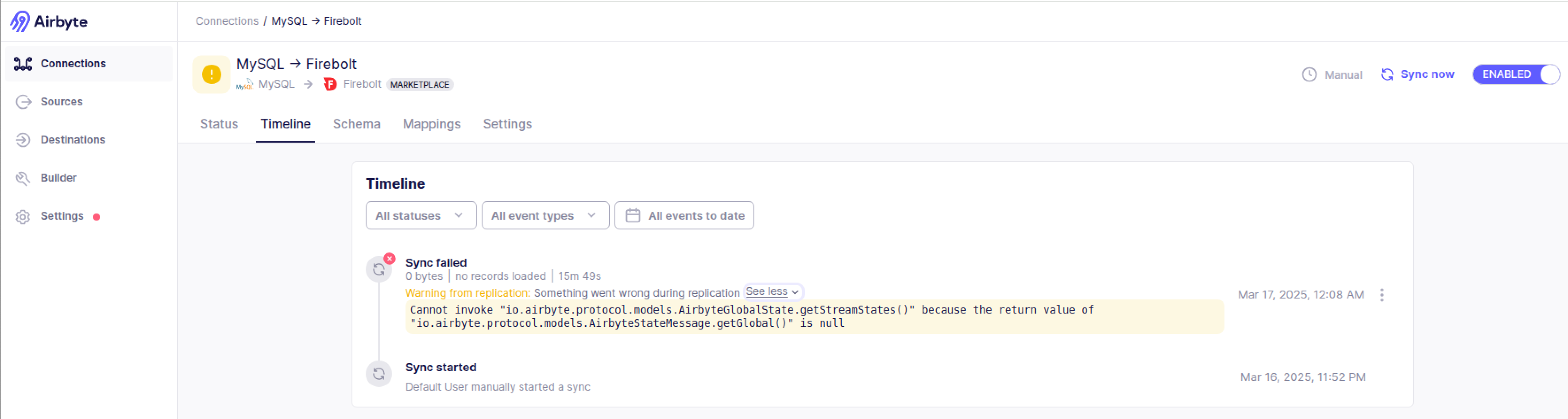
But there is one very interesting thing we found. Airbyte is essentially using Debezium for its MySQL extractor. We found that to be pretty strange since it competes with Debezium.
ziggy@instance-20240626-215025:~/Downloads$ cat mysql___firebolt_logs_3_txt.txt | grep -i debezium-engine
2025-03-16 23:53:05 info INFO debezium-engine i.d.c.c.BaseSourceTask(lambda$start$0):247    connector.class = io.debezium.connector.mysql.MySqlConnector
2025-03-16 23:53:05 info INFO debezium-engine i.d.c.c.BaseSourceTask(lambda$start$0):247    snapshot.locking.mode = none
2025-03-16 23:53:05 info INFO debezium-engine i.d.c.c.BaseSourceTask(lambda$start$0):247    max.queue.size = 8192
2025-03-16 23:53:05 info INFO debezium-engine i.d.c.c.BaseSourceTask(lambda$start$0):247    database.sslMode = preferred
2025-03-16 23:53:05 info INFO debezium-engine i.d.c.c.BaseSourceTask(lambda$start$0):247    include.schema.changes = false
2025-03-16 23:53:05 info INFO debezium-engine i.d.c.c.BaseSourceTask(lambda$start$0):247    schema.history.internal.store.only.captured.databases.ddl = true
2025-03-16 23:53:05 info INFO debezium-engine i.d.c.c.BaseSourceTask(lambda$start$0):247    schema.history.internal.file.filename = /tmp/airbyte-debezium-state11123047976539933388/dbhistory.dat
2025-03-16 23:53:05 info INFO debezium-engine i.d.c.c.BaseSourceTask(lambda$start$0):247    value.converter.replace.null.with.default = false
2025-03-16 23:53:05 info INFO debezium-engine i.d.c.c.BaseSourceTask(lambda$start$0):247    topic.prefix = public
2025-03-16 23:53:05 info INFO debezium-engine i.d.c.c.BaseSourceTask(lambda$start$0):247    decimal.handling.mode = string
2025-03-16 23:53:05 info INFO debezium-engine i.d.c.c.BaseSourceTask(lambda$start$0):247    binary.handling.mode = base64
2025-03-16 23:53:05 info INFO debezium-engine i.d.c.c.BaseSourceTask(lambda$start$0):247    offset.storage.file.filename = /tmp/airbyte-debezium-state11123047976539933388/offset.dat
2025-03-16 23:53:05 info INFO debezium-engine i.d.c.c.BaseSourceTask(lambda$start$0):247    errors.retry.delay.initial.ms = 299
2025-03-16 23:53:05 info INFO debezium-engine i.d.c.c.BaseSourceTask(lambda$start$0):247    converters = boolean,temporal
2025-03-16 23:53:05 info INFO debezium-engine i.d.c.c.BaseSourceTask(lambda$start$0):247    value.converter = org.apache.kafka.connect.json.JsonConverter
2025-03-16 23:53:05 info INFO debezium-engine i.d.c.c.BaseSourceTask(lambda$start$0):247    key.converter = org.apache.kafka.connect.json.JsonConverter
2025-03-16 23:53:05 info INFO debezium-engine i.d.c.c.BaseSourceTask(lambda$start$0):247    database.sessionVariables = autocommit=0
2025-03-16 23:53:05 info INFO debezium-engine i.d.c.c.BaseSourceTask(lambda$start$0):247    database.user = ziggy
2025-03-16 23:53:05 info INFO debezium-engine i.d.c.c.BaseSourceTask(lambda$start$0):247    database.dbname = public
2025-03-16 23:53:05 info INFO debezium-engine i.d.c.c.BaseSourceTask(lambda$start$0):247    offset.storage = org.apache.kafka.connect.storage.FileOffsetBackingStore
2025-03-16 23:53:05 info INFO debezium-engine i.d.c.c.BaseSourceTask(lambda$start$0):247    database.server.id = 5511
2025-03-16 23:53:05 info INFO debezium-engine i.d.c.c.BaseSourceTask(lambda$start$0):247    max.queue.size.in.bytes = 268435456
2025-03-16 23:53:05 info INFO debezium-engine i.d.c.c.BaseSourceTask(lambda$start$0):247    database.useCursorFetch = true
2025-03-16 23:53:05 info INFO debezium-engine i.d.c.c.BaseSourceTask(lambda$start$0):247    boolean.type = io.airbyte.integrations.source.mysql.MySqlSourceCdcBooleanConverter
2025-03-16 23:53:05 info INFO debezium-engine i.d.c.c.BaseSourceTask(lambda$start$0):247    time.precision.mode = adaptive_time_microseconds
2025-03-16 23:53:05 info INFO debezium-engine i.d.c.c.BaseSourceTask(lambda$start$0):247    temporal.type = io.airbyte.integrations.source.mysql.MySqlSourceCdcTemporalConverter
2025-03-16 23:53:05 info INFO debezium-engine i.d.c.c.BaseSourceTask(lambda$start$0):247    errors.retry.delay.max.ms = 300
2025-03-16 23:53:05 info INFO debezium-engine i.d.c.c.BaseSourceTask(lambda$start$0):247    offset.flush.timeout.ms = 5000
2025-03-16 23:53:05 info INFO debezium-engine i.d.c.c.BaseSourceTask(lambda$start$0):247    heartbeat.interval.ms = 10000
2025-03-16 23:53:05 info INFO debezium-engine i.d.c.c.BaseSourceTask(lambda$start$0):247    schema.history.internal.skip.unparseable.ddl = true
Wirekite Run
After running into a bunch of Out of Memory error, we found the right combination of threads.
Out of memory - Exceeded available 22.14 GiB RAM. Consider using an engine with more RAM.And we got a successful run.
1 BILLION rows moved in 9 minutes and 53 seconds.
$ cat wirekite.log | grep -E 'START|FINISH|ELAPSED'
START: Sun Mar 16 00:57:22 UTC 2025
FINISH: Sun Mar 16 01:07:15 UTC 2025
TOTAL ELAPSED TIME: 0 hrs 9 min 53 sec
An interesting to note here is how Firebolt loader lagged the mover. We want the lag to be minimum which essentially makes sure that we are using Firebolt to its full capacity. As you can see the loader - 01:07:15 data_loader.go:464: INFO all files processed - graceful shutdown - lagged the mover - 01:06:21 data_mover.go:321: INFO all files processed - graceful shutdown - by about a minute. Not bad !!
$ grep -E 'startup|shutdown' *.log
fb_loader.log:2025/03/16 00:57:23 data_loader.go:455: INFO graceful startup
fb_loader.log:2025/03/16 01:07:15 data_loader.go:464: INFO all files processed - graceful shutdown
fb_mover.log:2025/03/16 00:57:22 data_mover.go:298: INFO graceful startup
fb_mover.log:2025/03/16 01:06:21 data_mover.go:321: INFO all files processed - graceful shutdown
my_extract.log:2025/03/16 00:57:22 data_extractor_parallel.go:328: INFO graceful startup
my_extract.log:2025/03/16 01:06:10 data_extractor_parallel.go:221: INFO dumped 1250 files to /mnt/benchmark/dumpdir - graceful shutdown
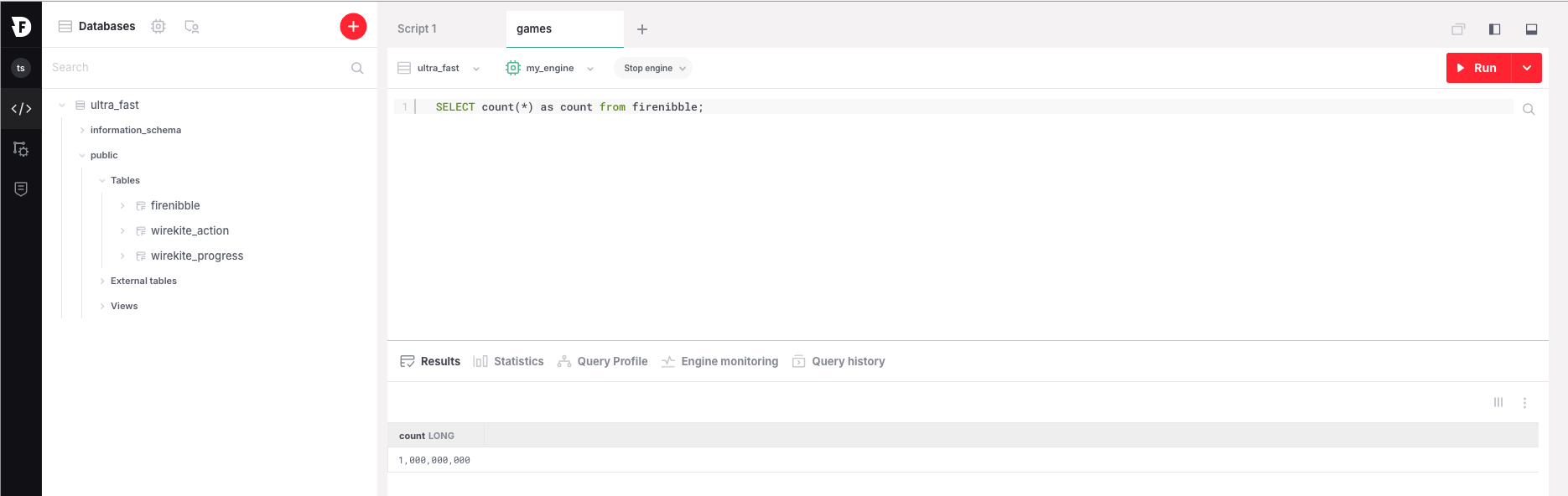
And here’s the 1 billion rows.
INFO[0000]log.go:182 gofirebolt.(*defaultLogger).Infof Credentials cache path: /home/ziggy/.cache/firebolt/temporary_credential.json
firebolt instance connect successful
=> select count(*) as count from firenibble;
1: count: 1000000000
And on the GUI