


So we did our first Firebolt benchmark. And wow this was quite a ride. Firebolt is very different from other warehouses - the tradeoffs are really interesting. Some good, Some bad, in our opinion. As I go through the benchmark I will talk about that.
We chose to compare our benchmark with Airbyte since that is one of the most recognized data migration enterprise software out there.
This was inspired from a benchmark that Airbyte published - https://airbyte.com/blog/postgres-replication-performance-benchmark-airbyte-vs-fivetran.
I do want to mention here that Firebolt benchmark is a little different, and slightly slower than what it could possibly be and the reason being that our database server is in GCP while our Firebolt bucket is in AWS. That is definitely a network hop, that will do some latency, as opposed to going from GCP to GCP. This probably explains why Firebolt benchmarks are slightly slower.
Benchmark Details
Table
As usual we decided to use our same firenibble table that Airbyte used in their benchmark. We have standardized on this table because we want our benchmarks to be almost a fair comparison between various databases.
The table has a numeric primary key column, some number columns, some string columns and some date columns. This fits nicely with most databases.
CREATE TABLE firenibble
(
    f0 BIGINT PRIMARY KEY GENERATED ALWAYS AS IDENTITY,
    f1 BIGINT,
    f2 BIGINT,
    f3 INTEGER,
    f4 DOUBLE PRECISION,
    f5 DOUBLE PRECISION,
    f6 DOUBLE PRECISION,
    f7 DOUBLE PRECISION,
    f8 VARCHAR COLLATE pg_catalog."default",
    f9 VARCHAR COLLATE pg_catalog."default",
    f10 DATE,
    f11 DATE,
    f12 DATE,
    f13 VARCHAR COLLATE pg_catalog."default",
    f14 VARCHAR COLLATE pg_catalog."default",
    f15 VARCHAR COLLATE pg_catalog."default"
) tablespace benchmark ;
And here’s the 1 billion rows.
wirekite=# select count(*) from firenibble;
   count
------------
 1000000000
(1 row)
Machine Configurations
For Postgres we created an n2-standard-64 GCP instance with all the standard configurations - 64 CPU’s and 256 GB RAM in the us-central region.
For Firebolt we created an engine with M size (medium), 5 nodes, 2 clusters and it was COMPUTE_OPTIMIZED. We created the engine in us-east region. Firebolt does not offer us-central region. Also Firebolt does not offer L size by default that other cloud vendors offer. We got the following message when we tried to upgrade our engine.
 => ALTER ENGINE my_engine SET TYPE = "L" NODES = 5 MIN_CLUSTERS=1 MAX_CLUSTERS = 2;
2025/03/15 22:46:31 ERROR query ALTER ENGINE my_engine SET TYPE = "L" NODES = 5 MIN_CLUSTERS=1 MAX_CLUSTERS = 2 failed: error during query execution: error during query request: Alter engine failed. 'L' node type is currently in preview. Reach out to Firebolt Support to enable 'L' node type for this account
=>
Firebolt Command Line
Also this is where we discovered that Firebolt does not offer command line. Very Strange for a database /engineer focused company.
So we build our own Firebolt Command Line !!
=> ALTER ENGINE my_engine SET TYPE = "M" NODES = 5 MIN_CLUSTERS=1 MAX_CLUSTERS = 2 FAMILY=CO;
ok
=> show engines;
1: engine_name: my_engine
1: engine_owner: sandhu.nurat
1: type: M
1: family: COMPUTE_OPTIMIZED
1: nodes: 5
1: clusters: 1
1: status: RUNNING
1: auto_start: 1
1: auto_stop: 20
1: initially_stopped: 0
1: url: account-1-ewafh.api.us-east-1.app.firebolt.io?engine=my_engine
1: default_database:
1: version: 4.16.8
1: last_started: 2025-03-16 20:29:35.366
1: last_stopped: 2025-03-16 20:20:19.808
1: description:
1: fbu_rate: 40
=>
You can also see tables and their various properties
=> show tables;
1: table_name: firenibble
1: table_type: BASE TABLE
1: column_count: 16
1: primary_index: f0
1: schema: CREATE TABLE "firenibble" ("f0" BIGINT NOT NULL, "f1" BIGINT NULL, "f2" BIGINT NULL, "f3" INTEGER NULL, "f4" DOUBLE PRECISION NULL, "f5" DOUBLE PRECISION NULL, "f6" DOUBLE PRECISION NULL, "f7" DOUBLE PRECISION NULL, "f8" TEXT NULL, "f9" TEXT NULL, "f10" DATE NULL, "f11" DATE NULL, "f12" DATE NULL, "f13" TEXT NULL, "f14" TEXT NULL, "f15" TEXT NULL) PRIMARY INDEX "f0"
1: number_of_rows: 1000000000
1: compressed_bytes: 216.93 GiB
1: uncompressed_bytes: 234.69 GiB
1: compression_ratio: 1
1: number_of_tablets: 1586
=>
Sweet !!
Wirekite Run
And the the fun began. We tried different combination of number of threads and number of nodes but we kept on getting the following error. Out of Memory !!
2025/03/15 22:10:46 data_loader.go:201: ERROR insert/select into table failed: error during query execution: error during query request: Out of memory - Exceeded available 22.14 GiB RAM. Consider using an engine with more RAM.
2025/03/15 22:10:46 data_loader.go:332: ERROR public.firenibble: error during query execution: error during query request: Out of memory - Exceeded available 22.14 GiB RAM. Consider using an engine with more RAM.
Finally we found a combination that worked. It was 24 threads.
$ cat wirekite.log | grep -E 'START|FINISH|ELAPSED'
START: Sat Mar 15 23:00:47 UTC 2025
FINISH: Sat Mar 15 23:12:24 UTC 2025
TOTAL ELAPSED TIME: 0 hrs 11 min 37 sec
But we discovered that we were not bringing Firebolt down to its knees. Our logs told us that the loader took 5 more minutes to load the files after the mover had already moved them. As you can see here the mover finished at 23:08:54 data_mover.go:321: INFO all files processed - graceful shutdown but the loader finished at 23:12:24 data_loader.go:464: INFO all files processed - graceful shutdown.
$ grep -E 'startup|shutdown' *.log
fb_loader.log:2025/03/15 23:00:47 data_loader.go:455: INFO graceful startup
fb_loader.log:2025/03/15 23:12:24 data_loader.go:464: INFO all files processed - graceful shutdown
fb_mover.log:2025/03/15 23:00:47 data_mover.go:298: INFO graceful startup
fb_mover.log:2025/03/15 23:08:54 data_mover.go:321: INFO all files processed - graceful shutdown
pg_extract.log:2025/03/15 23:00:47 data_extractor.go:290: INFO graceful startup
pg_extract.log:2025/03/15 23:07:54 data_extractor.go:196: INFO dumped 1380 files to /mnt/benchmark/dumpdir - graceful shutdown
ziggy@instance-20250305-200657:~/benchmark/logs.20250315-231224.pg.fb.24$
Time to up the threads.
And that’s when we got our fastest run.
1 BILLION rows loaded in 8 minutes and 47 seconds.
$ cat wirekite.log | grep -E 'START|FINISH|ELAPSED'
START: Sat Mar 15 23:22:43 UTC 2025
FINISH: Sat Mar 15 23:31:30 UTC 2025
TOTAL ELAPSED TIME: 0 hrs 8 min 47 sec
And the loader was lagging behind the mover by only 30 seconds. Sweet.
$ grep -E 'startup|shutdown' *.log
fb_loader.log:2025/03/15 23:22:43 data_loader.go:455: INFO graceful startup
fb_loader.log:2025/03/15 23:31:30 data_loader.go:464: INFO all files processed - graceful shutdown
fb_mover.log:2025/03/15 23:22:43 data_mover.go:298: INFO graceful startup
fb_mover.log:2025/03/15 23:30:50 data_mover.go:321: INFO all files processed - graceful shutdown
pg_extract.log:2025/03/15 23:22:43 data_extractor.go:290: INFO graceful startup
pg_extract.log:2025/03/15 23:29:52 data_extractor.go:196: INFO dumped 1380 files to /mnt/benchmark/dumpdir - graceful shutdown
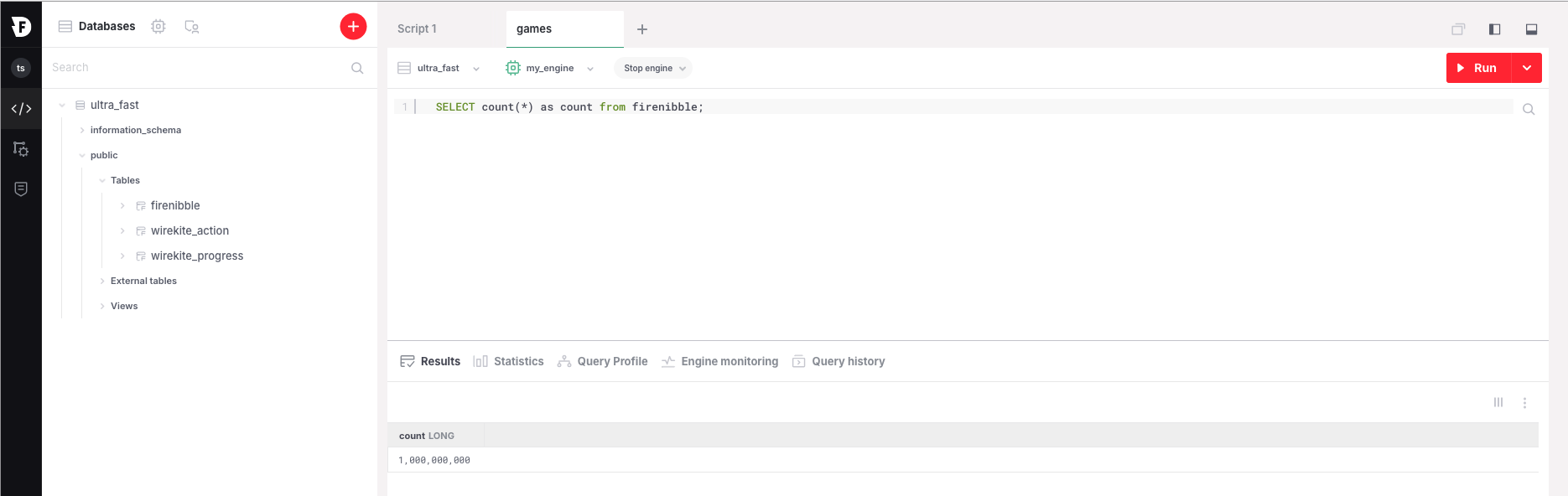
And here’s the 1 Billion rows.
$ ./cmdline -c ~/wirekite/benchmark/urlfiles/fi_url.txt
INFO[0000]log.go:182 gofirebolt.(*defaultLogger).Infof Credentials cache path: /home/ziggy/.cache/firebolt/temporary_credential.json
firebolt instance connect successful
=> select count(*) as count from firenibble;
1: count: 1000000000
Or in the GUI
Airbyte Run
Running Airbyte for this connector had it’s fair share of adventures.
There were two ways to configure Airbyte to Firebolt - Inserts or S3 Bucket. We chose the bucket because it the fastest and it is what we used for our runs.
First we ran into AWS bucket permission errors. Not sure why we got that since it is configured with the same security context as our other runs. But we kept on running into this.
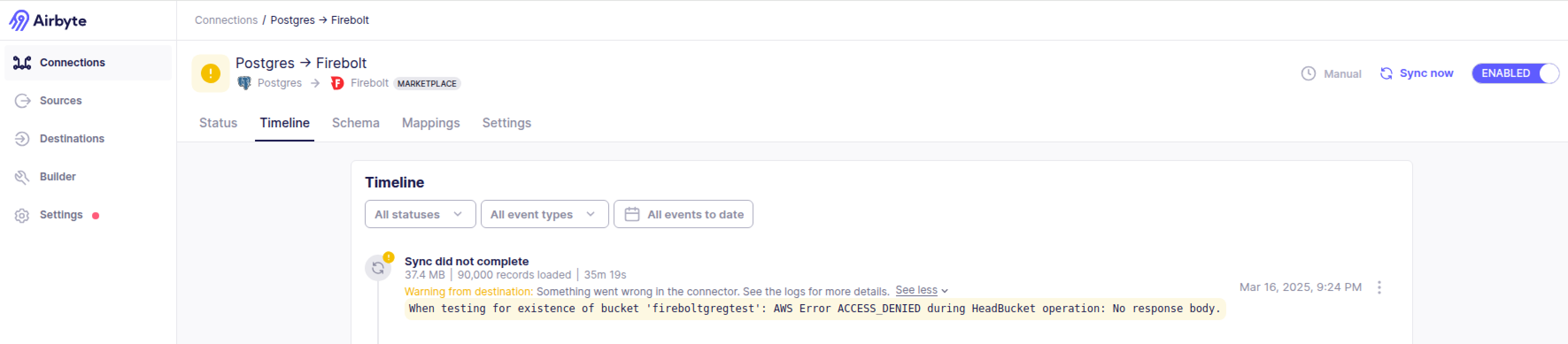
So we decided to move to Airbyte Cloud. And then it worked. But something to notice here - It seems airbyte first moves the data to the bucket and then loads the bucket to Firebolt. While it is loading data to the bucket it (hopefully) does not touch Firebolt so the engine possibly go to sleep, which is good since you are not charged for that time.
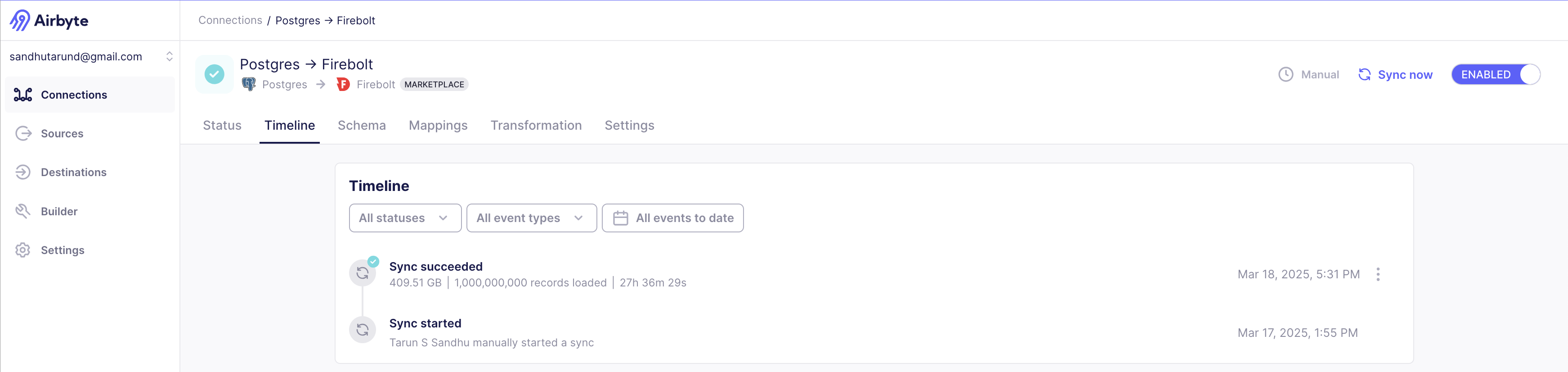
And here’s the Airbyte run. It took Airbyte 27 hours and 36 minutes to move 1 billion rows.
  "status" : "completed",
  "recordsSynced" : 1000000000,
  "bytesSynced" : 439710415164,
  "startTime" : 1742245104251,
  "endTime" : 1742344306406,
  "totalStats" : {
    "bytesCommitted" : 439710415164,
    "bytesEmitted" : 439710415164,
    "destinationStateMessagesEmitted" : 100000,
    "destinationWriteEndTime" : 1742344306238,
    "destinationWriteStartTime" : 1742245104389,
    "meanSecondsBeforeSourceStateMessageEmitted" : 20,
    "maxSecondsBeforeSourceStateMessageEmitted" : 100000,
    "maxSecondsBetweenStateMessageEmittedandCommitted" : 636,
    "meanSecondsBetweenStateMessageEmittedandCommitted" : 14,
    "recordsEmitted" : 1000000000,
    "recordsCommitted" : 1000000000,
    "recordsFilteredOut" : 0,
    "bytesFilteredOut" : 0,
    "replicationEndTime" : 1742344306337,
    "replicationStartTime" : 1742245104251,
    "sourceReadEndTime" : 1742343674956,
    "sourceReadStartTime" : 1742245104390,
    "sourceStateMessagesEmitted" : 100000
  },
  "streamStats" : [ {
    "streamName" : "firenibble",
    "streamNamespace" : "public",
    "stats" : {
      "bytesCommitted" : 439710415164,
      "bytesEmitted" : 439710415164,
      "recordsEmitted" : 1000000000,
      "recordsCommitted" : 1000000000,
      "recordsFilteredOut" : 0,
      "bytesFilteredOut" : 0
    }
  } ],
Also just to be clear we did use the S3 bucket method to do the load - info Using the S3 writing strategy
2025-03-17 13:58:25 info Creating status: public:firenibble - RUNNING
2025-03-17 13:58:25 info INFO main i.a.i.s.p.PostgresQueryUtils(fileNodeForIndividualStream):235 Relation filenode is for stream "public"."firenibble" is 42019
2025-03-17 13:58:25 info INFO main i.a.i.s.p.c.InitialSyncCtidIterator(createCtidQueryStatement):300 Preparing query for table: firenibble
2025-03-17 13:58:25 info INFO main i.a.i.s.p.c.InitialSyncCtidIterator(createCtidQueryStatement):309 Executing query for table firenibble: SELECT ctid::text, "f0","f1","f2","f3","f4","f5","f6","f7","f8","f9","f10","f11","f12","f13","f14","f15" FROM "public"."firenibble" WHERE ctid > ?::tid AND ctid <= ?::tid with bindings (0,0) and (131072,0)
2025-03-17 13:58:25 info INFO main i.a.c.d.j.s.AdaptiveStreamingQueryConfig(initialize):24 Set initial fetch size: 10 rows
2025-03-17 13:58:26 info INFO main i.a.c.d.j.s.AdaptiveStreamingQueryConfig(accept):33 Set new fetch size: 173376 rows
2025-03-17 13:58:26 info Using the S3 writing strategy
2025-03-17 13:58:26 info INFO main i.a.c.d.j.s.TwoStageSizeEstimator$Companion(getTargetBufferByteSize):80 Max memory limit: 1610612736, JDBC buffer size: 966367642
2025-03-17 13:58:26 info Stream firenibble is wiped.
2025-03-17 13:58:26 info INFO main i.a.c.d.j.s.AdaptiveStreamingQueryConfig(accept):33 Set new fetch size: 637866 rows
2025-03-17 13:58:27 info INFO main i.a.c.d.j.s.AdaptiveStreamingQueryConfig(accept):33 Set new fetch size: 636606 rows
2025-03-17 13:58:27 info INFO main i.a.c.d.j.s.AdaptiveStreamingQueryConfig(accept):33 Set new fetch size: 635350 rows
2025-03-17 13:58:28 info INFO main i.a.c.d.j.s.AdaptiveStreamingQueryConfig(accept):33 Set new fetch size: 631613 rows
I started wondering why did it take so long while it moved the same table to Snowflake in 12 hours. And I think the answer is this. Airbyte apparently creates the migrated table as 3 columns.
-
_airbyte_ab_id: a uuid assigned by Airbyte to each event that is processed. The column type in Firebolt isVARCHAR. -
_airbyte_emitted_at: a timestamp representing when the event was pulled from the data source. The column type in Firebolt isTIMESTAMP. -
_airbyte_data: a json blob representing the event data. The column type in Firebolt isVARCHARbut can be parsed with JSON functions.
So all the row data is stored as a JSON. My guess is Airbyte is spending hell lot of time making a JSON out of each row.
Which is what we saw in our Firebolt database.
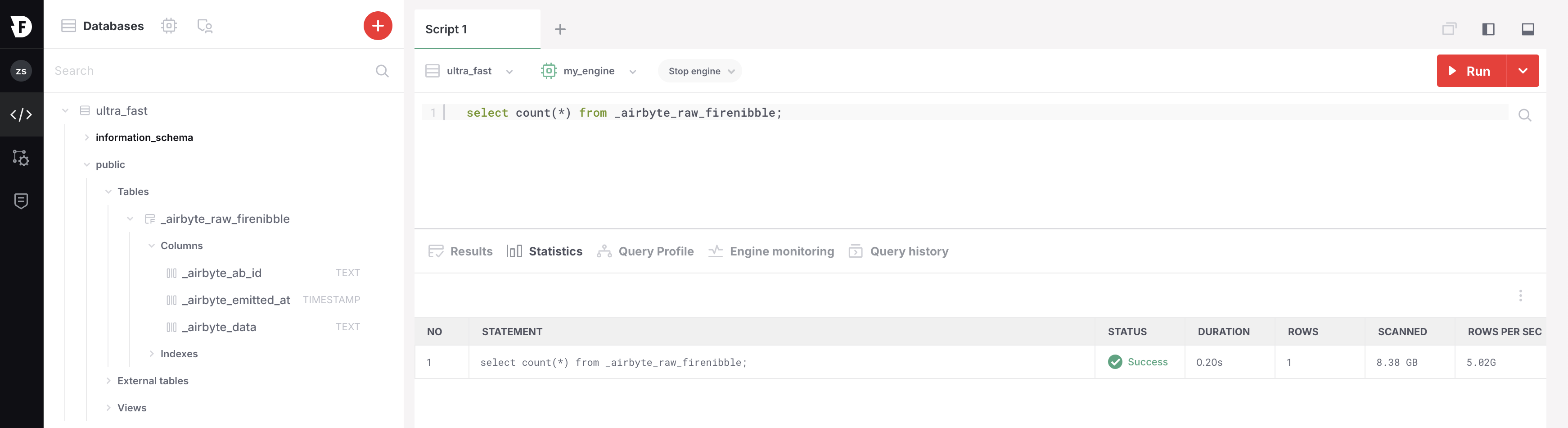
By the way did you notice the query to do count ran in 0.20 seconds. Sweet !!